


miss her smile..
miss her smile..
What do you do when there is no optical drive in your PC or Laptop and you want to install a Windows XP on it? You can use a USB drive to do the same. Here is a detailed step by step procedure to install Windows XP from a USB Flash Drive in your computer. Before we Install, we should create a bootable USB flash drive with Windows XP loaded into it. This will be required if we want to reinstall the OS.
Previously we discussed How to Boot into Windows XP using a Flash Drive
In order to install Windows XP from a flash drive, first you should dump your OS into this thumb drive. In order to do that, you will need
Here is the procedure to make the USB Flash Drive ready i.e., to make it bootable.
Download the software ‘Komku-SP-usb.exe’ from this link and execute it. The executable file will extract the necessary utilities to a folder called ‘C:\komku’.
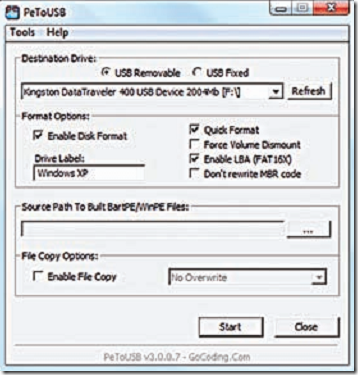
Once the package has been extracted, go to the folder ‘C:\komku\PeToUSB’ using Windows Explorer. Execute the file ‘PeToUSB.exe’. Plug in the USB flash drive and make sure you choose the following (see image below) before clicking the start button.
Select ‘USB removable’, ‘Enable Disk Format’, ‘Quick format’, ‘Enable LBA (Fat 16x)’ and finally give the drive a name under ‘Drive Label’. Once it’s done, click start to let the utility format the drive.
Next you will need to start the command prompt. Click ‘Start > Run’, type ‘cmd’ and press [Enter]. Then go to the ‘bootsect’ directory by typing the command ‘cd C:\komku\bootsect’ and pressing [Enter].
Now type the command ‘bootsect /nt52 F:’ and press [Enter]. (The ‘F:’ is the USB flash drive letter represented in ‘My Computer’. Check to verify the drive letter used by your USB flash drive). Let the utility do the needful. Do not exit the Command Prompt yet.
Now you will need to change to the directory ‘Usb_Prep8’ by using the command ‘cd C:\komku\usb _ prep8’ and pressing [Enter].
Here execute the command ‘usb _ prep8’ and press [Enter]. Press any key to continue and you will see a welcome screen with a menu appear in the Command Prompt.
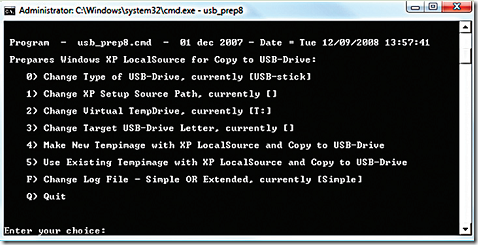
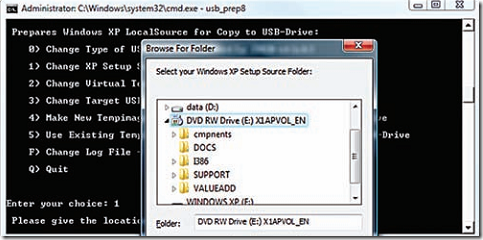
Now at this stage, you will have to insert the Windows XP installation disk into your optical drive. At the Command Prompt menu, type ‘1’ and press [Enter]. A new popup will appear asking you to choose the location (path) of the Windows installation disk.
Select the optical drive and click ‘OK’. Next choose ‘2’ from the menu and change the drive letter to any drive letter which has not been taken. It is drive ‘T:’ by default and you can ignore this step unless you do have a ‘T:’ drive on your computer. After this, choose ‘3’ from the menu and enter the drive letter of your USB flash drive (in this case it would be ‘F’).
Finally choose ‘4’ from the menu and press [Enter]. Wait for a few seconds for the process to complete and you will see a prompt to allow the utility to format the USB fash drive. Type ‘Y’ and then press [Enter] at this stage to let the utility proceed and install the necessary files from the Windows XP installation disk to the USB flash drive. This process will take a few minutes and depends on the speed of the flash drive.
After the files are copied, you will see a popup window asking you for permission to copy files from the temp drive to the USB flash drive. Select ‘Yes’.
Next there will be another popup window asking you to allow the utility to change the boot drive letter of the USB flash drive from ‘F:’ to ‘U:’. Select ‘Yes’.
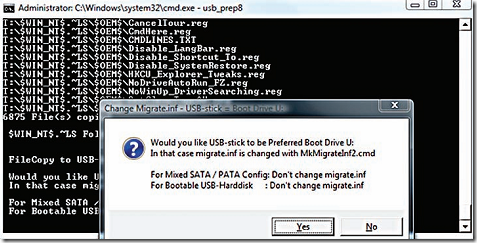
Finally, after all the processes are complete, you will see yet another popup window asking if you want to unmount the virtual drive. Select ‘Yes’. Exit the Command Prompt now and you will see that your flash drive is ready to install Windows XP to another computer.
To install Windows XP to the computer, you will have to do the following steps..
Follow the necessary steps to install Windows XP and your computer will be up, raring and ready to go and running Windows in no time. This is an easy and better way to install your Operating System as a USB port is available on every system.


Kepada Bf anak aku,
Peraturan 1: Kalo ko sampai kat pagar umah aku pastu dok hon…hon, pastikan ko bawak barang yang nak dihantar..sebab ko takkan ambik ape2 atau sesapa.
Peraturan 2: Jangan ko pegang2 anak aku depan atau belakang aku. Ko boleh pandang dia, selagi mata ko tak merayau lebih dari paras leher anak aku. Kalo ko takleh jaga tangan ko dari dok pegang2 anak aku..aku boleh tolong cabut dan jaga tangan ko kat umah..
Peraturan 3: Aku tau skang nih fesyen budak2 pakai seluar londeh sampai nampak boxer atau spender ko. Aku ni open-minded, so aku takkan suruh ko pakai seluar tu elok2 cam manusia normal. Tapi, bagi memastikan yang seluar ko takkan terbukak atau dibukak semasa ber’dating’ ngan anak aku, aku akan pakai stapler gun kat dalam laci aku nih untuk lekatkan seluar ko kat pinggang.
Peraturan 4: Aku rasa mesti ko tau pasal kempen seks ‘selamat’ yang omputih dok canang hari2 kat tv atau internet. Kalo tak pakai perlindungan cam kondom atau lain2, ko mungkin akan dapat penyakit yang mungkin membunuh ko satu hari nanti. Meh sini aku nak bagitau, kalo ngan anak aku ni, aku lah pelindung tuh..dan aku akan mendatangkan sakit kat tubuh badan ko dan kemungkinan besar akan bunuh ko jugak. Paham?
Peraturan 5: Biasalah kalo ko nak berkenalan lebih baik ngan aku ni sebagai calon bapak mertua ko..ko nak berbual pasal politik, pasal sukan atau lain2 topik semasa. Aku takmo dengar semua tuh. Satu jer topik yang aku minat nak dengar: bila ko nak antar anak aku balik ke umah ni semula? Dan jawapan yang aku nak dengar cuma: “Awal.”
Peraturan 6: Aku rasa ko ni hensem, popular kat kolej/pejabat ko, banyak peluang nak dating ngan aweks2 lain yang lagi kiut-miut..aku takde hal ngan kelebihan ko tu..selagi anak aku pon ok dengan kepopularan ko. Tapi, sekali ko dah couple ngan anak aku, ko jangan pandai2 cari pompuan lain sampai la anak aku dah bosan ngan ko atau dia break-off ngan ko. Kalo ko wat anak aku nangis, aku pulak akan wat ko nangis.
Peraturan 7: Sementara ko menunggu anak aku bersiap, jangan dok mengeluh kalo dia bersiap lama sangat. Kalo ko nak orang yang punctual, ko leh dating ngan mat askar. Kalo ko bosan menunggu kat luar tu, tolong le wat ape yang patut, cam basuh keta aku atau cat pagar umah aku ni.
Peraturan 8: Tempat2 berikut adalah dilarang sama sekali korang pergi dating; tempat yang ada katil, ada sofa, ada rumput atau apa2 tempat yang leh duduk2 atau baring2. tempat2 yang takde kehadiran orang tua, polis, tok imam. Tempat2 yang gelap. Tempat2 yang membolehkan korang berpegang tangan/menari atau bersukaria. Tempat2 yang panas sampai membuatkan anak aku terpaksa pakai tshirt takde lengan..pakai short skirt. Tempat yang sejuk sampai ko kena panaskan badan anak aku. Movie yang romantic, berunsurkan cium2 tu elakkan. Movie pasal seksa kubur atau hari kiamat dibolehkan.
Peraturan 9: Jangan sekali-kali menipu aku. Aku ni nampak jer perut buncit, kepala hampir botak, tapi aku akan tau semua pergerakan ko dari spy2 aku. Kalo aku tanya ko nak pegi mana, dengan sapa lagi yang join ngan korang, ko ada satu peluang jer nak jawab dengan benar, tiada yang tak benar melainkan benar belaka. Aku ada satu senapang patah, satu cangkul dan lima ekar tanah yang penuh hutan kat belakang umah aku ni. Selalunya aku dok menembak khinzir kat situ. Kalo aku tembak kepala ko kat belakang tu, takde sapa yang nak tanye. Jangan main2 ngan aku.
Peraturan 10: Ko patut takut ngan aku ni..kalo boleh biar sampai sangat2 takut. Aku ni dok teringat2 lagi peristiwa bukit kepong. Sampai skang kalo ada orang datang umah senyap2 pastu dok berbual kat laman aku nak tembak..aku ingatkan komunis. Nanti dah abih dating, sampai kat pintu pagar, bukak pintu kereta dan angkat dua2 tangan ko tinggi2. Cakap dengan jelas “saya datang antar anak pakcik”. Pastu terus blah. Tak payah masuk minum teh. Kilauan matahari yang ko nampak kat tingkap umah aku ni ialah teropong senapang sniper aku.
Sekian, Yg sengaja menakutkan, Bapak Kepada Gf ko.

http://www.ehoza.com/v4/forum/contest-competition/133244-ehoza-blogging-contest-2010-a.html

